

M.H.N.M. Nasir
Faculty of Computer Science and Information Technology, University of Malaya, 50603, Kuala Lumpur, Malaysia
N.H. Hassan
Faculty of Computer Science and Information Technology, University of Malaya, 50603, Kuala Lumpur, Malaysia
S.S.M. Fauzi
Faculty of Information Technology and Quantitative Sciences, Universiti Teknologi MARA, Perlis Campus, Arau, 02600 Perlis, Malaysia
Information Technology Journal
Year: 2008 | Volume: 7 | Issue: 6 | Page No.: 840-849





ABSTRACT
This study will point out the major windows registry security issues in windows-based platforms and explain how the development of an automated tool can enhance the security level and optimize the performance of the system by tuning the windows registry settings. This security tool named registry tuning tool can assist the system administrator to optimize The registry settings in a simpler, faster way than manually configured tools. With added features such as dynamic-binding mechanism, multi-user environment support and user authentication, this tool is more usable, flexible and secure and applicable for any level of users. The tool developed then test by 50 users to see the usability, reliability, security and correctness of its functionality.
PDF Abstract XML References Citation
How to cite this article
M.H.N.M. Nasir, N.H. Hassan and S.S.M. Fauzi, 2008. Protecting Windows Registry Directory and Hence Increasing the Security Level of the Windows Operating System. Information Technology Journal, 7: 840-849.
DOI: 10.3923/itj.2008.840.849
URL: https://scialert.net/abstract/?doi=itj.2008.840.849
DOI: 10.3923/itj.2008.840.849
URL: https://scialert.net/abstract/?doi=itj.2008.840.849
INTRODUCTION
Windows registry is one of the main components of the Windows 9x/ME, Windows CE, Windows NT/2000/XP/ 2003 and Windows Vista. It is used to store the system wide-resources which are naturally shared by all applications available in the system. Owing to its importance, most system-attackers tend to crack and alter the Registry settings in order to exploit the user`s system security. Thus most system administrators attempt to enhance their system security level by installing anti-virus, anti-spyware and firewalls and modifying the Registry settings as well. Anti-spyware software or tools which can is a cure for any spyware problems the most suggested solution where it monitors threads and removes it from the system as mentioned by Wu et al. (2007). But resulted from the study by Lee and Kozar (2008) only 10% users adopted to user the anti-spyware tool. Meanwhile, firewall also one of the option to ensure the security for the operating system where as an enhancement of using firewall discussed by Abassi and Fatmi (2008) and Pereira and Ordonez (2008). By modifying the registry settings, it is a risky action that might cause system instability. Any change to the registry settings will affect the stability of the operating system, even to the extent that the whole system could collapse owing to misconfiguration of this important component. Attackers can exploit the operating system easily, if the registry is not well-configured and well-protected. Protecting the registry manually is not a simple job. It requires a user or administrator who is really familiar with the Windows security architecture as well as the structure of the Windows Registry.
An automated tool is necessary to help the system administrator to secure their Windows operating system and optimize the system performance. An automated Windows Registry tool may reduce the system administrator`s workload and the time spent on configuring the Registry settings compared with the manual process. It can also optimize the system performance and allow an administrator to customize their system working environment preferences according to their needs or organization policy. Furthermore, the importance of Windows Registry in aiding the computer forensics are discussed by Kim and Hong (2008), Chang et al. (2007), Mee et al. (2006) and Carvey (2005).
The motivation for this research and development came from the problems identified by Lynette et al. (2007), who produced a framework that can be used to prevent injection attacks on Windows. There is also a statistical showing that malicious software can harm the Windows Registry by modifying all the data inside to hack or attack computers. In addition to being pervasive, malicious mobile codes tend to change in how they behave over time. A detection system must therefore be able to handle known as well as unknown threats (Mazeroff et al., 2008).
Inappropriate configuration of file-sharing features will also allow intruders, such as Nimda worms, to access critical system files and compromise them. Although Windows has several tools and options to customize system settings, such as the Control Panel, it only provides the user with entry level of customization. Third-party tools overcome these problems by developing their own Registry Tuning Tool, but most of them are not free and not cost-effective. Thus, it is important to develop a tool to overcome the identified problems and assist system administrators to configure their system Registry settings more easily and safely, thereby reducing system collapses owing to misconfiguration.
Overview of windows security: Windows NT security model tends to affect the entire Windows NT operating system. Windows Security acts as a central location, which verifies all access to, objects first, so that no application or user can access them without correct authorization. NT-based Windows have implemented the inter-process protection described by Viega and Vaos (2000) to ensure that a single process cannot directly access the memory which is allocated to other processes and also cannot directly access the memory in use by the operating system. This will greatly reduce the chances of error occurrence. The inter-process protection did not exist at all, however, in earlier 16-bit Windows. Because of that, the intruder can simply change the data in other programs since all programs share a single address space. Before developing a tool as a guard to secure an operating system, it is important to understand the system behavior itself. Most significant is the behavior related to the security-relevant input. System administrators can focus on a protection of that input to prevent unauthorized usage and the harm that can be caused by malicious users with unlimited resources can be avoided. Component of the NT-based windows are divided into two, user space and an operating system kernel. Most of the applications are executed in the user-level code, also known as user space, described by Viega and Vaos (2000) but occasionally it needs to make a call to the kernel if any application needs special services from the operating system. Kernels are where the operating system developers typically implement the security policies to manage access to devices, files, processes and objects. In short, the applications which are running in user space will experience the security restrictions that are implemented in the kernel. NT-based operating systems may have several different components in the kernel that make up the Windows security model. Each of them plays an important role within the overall NT security model to insure that the resources will only be available to the authenticated and authorized applications. Some of the NT`s biggest shortcomings are poor user authentication, a susceptibility to malicious code and lack of mandatory access control.
Overview of windows registry: The Windows Registry is universal, with a hierarchical information database where all entries can be accessed by keys which store the configuration data for the operating system to make it function properly. Each registry key has a security context attached to it which controls the access to the keys. In the earlier version of Windows (especially 16-bit Windows), the same information was stored in the text file. The organization of the text files, however, makes access to the settings slower. It is also unable to keep up with the increasing speed of current hardware technologies.
The Registry is organized as a tree where every entry is called a key and has an associated value. The Windows Registry is an effective data source for monitoring attacks because many attacks are detectable through anomalous Registry behavior. The Registry is not stored in a single file in the hard drive. Windows stores the Registry in a few separate binary files which is called Hives. The Hives have a different value which has a different purpose. Supported by Kim and Hong (2008), they also mentioned on threats that can happened in Registry that related to the forensic analysis from forensic related registry keys and suspect`s viewpoints. The Windows Registry contains three important components, which are the hives, keys and data entries. A Hive is similar to the root directory on a drive. It is the highest level in the Registry structure and therefore the hive cannot be a sub-hive inside another hive in the Registry. Hives` names have the prefix HKEY to show that it is a handler and contains the Keys (just as the files and directories are contained in a root directory).
Keys/Subkey are an organizational unit in the Registry and can contain data entries or further subkeys. A key will have either a Hive or Key as a parent above it. A Key`s name is not case-sensitive but it must be unique within a key or subkey. Sometimes Microsoft refer to the key as a sub-hive. Data Entries (Values), can be the instructions for how specified applications, devices or the operating system should behave. Data entries comprise three parts, the data entries name, data entries type and the data entries data.
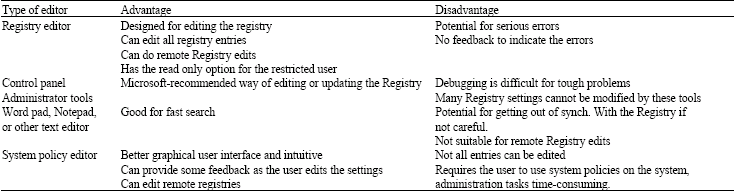
| Table 1: | The advantages and disadvantages of common tools |
 | |
Windows Registry is related to the Windows Component. Windows Registry comprises a lot of settings including the control on the system to run services, launch applications, to use or to load some devices. Some of these settings may change or be updated depending on each time the system boots.
The Windows components that will modify the Registry settings include device drivers, hardware application and network protocol. A device driver is a piece of software that allows a hardware device to communicate with the operating system. The device drivers rely on Windows Registry to store and retrieve the configuration parameters and also to load the needed data during the system start-up. The Registry provides a centralized storage area for system resource information about IRQ settings, DMA channel and configuration settings for device drivers. Hardware is where the configuration and set-up information is stored in the Registry when the user installs certain hardware devices in their system. Application will store the related information, such as associated file extension, the application path and also the related uninstaller in the Registry for further reference. Protocol. Windows Registry is responsible for keeping track of a number of network protocol values, such as the internet proxy settings or MTU size in the system configuration.
Although the Registry is a powerful tool to customize the Windows settings, most system administrators would not make the Registry their first choice to customize the system. Inexperienced system administrators prefer to use the Windows utilities tools (such as the control panel) instead of using the Registry to reduce the risks while they are trying to customize Windows. Sometimes the administrator may inadvertently corrupt the Registry entries when they try manually to fix misconfiguration problems using a Registry editor. Using the specific tools to customize Windows is safer than using the Registry. Corrupted Registry settings can result in the operating system`s network connection being disabled, specified hard-drive partition or optical drive becoming inaccessible, or the system logging out a user upon any successful login and the danger is that the system administrators are forced to reinstall the operating system if the Registry corruption is too great and cannot be recovered. Table 1 shows the common tools chose by administrator in order to modify the Registry. These listed the advantage and disadvantages by using it.
Analysis: Compagna et al. (2007) emphasize that in a corporate world security is becoming an important asset, whereby customers are picking and choosing suppliers evidencing privacy and security practices. Security critical action is defined as an action which will compromise system security if it is conducted in an uncontrollable manner. Security is relevant to analysis inasmuch as an input will affect the behavior of at least one security critical action in the system and the type of input can vary from input from user, to input or read from file, network, environment variable and other processes to Windows Registry keys as mentioned by Du et al. (1999).
A registry key or value is security-relevant to the system if an improper change in its value can lead to violation of system security, including confidentiality, integrity, accountability and availability. Some of the registry keys high in security-relevance should be configured as protected resources to which the non-privileged user cannot make arbitrary modification. This can make the system more secure and avoid Registry misconfiguration problems caused by the unauthorized user.
The security action in Windows NT is categorized into two categories, which are non-security critical action and security critical action. For the non-security critical action, the input will not compromise the system security even though it is misconfigured. This project is more concerned with the security critical action as listed below and it is categorized by the target for which the actions are applied:
Executable: Program execution, load dynamic link library and executing procedure or invoking a service.
Permission or Privilege: The editing or modifying of the permission or privilege on a target. The target can be any file, folder, root drive or application.
File or directory: Action on the files and folders, including reads, writes and destroys.
Registry: Settings in the Registry. Usually refers to the access right on specific keys.
Network: The right to access the internet or network to connect to internet.
Process and Service: If the changing of a process or a service is inappropriate, it might cause denial-of-service problems.
Security policy: To determine the specific user privilege on the computer.
Four existing tools to modify Windows Registry that are currently available on the market are identified and analyzed: XP Smoker, Regtick, TweakUI and FitW. These four tools, as shown in Table 2, have their own advantages and disadvantages based on the criteria used. These tools may have their own characteristics, which include ease-of-use, rich settings, protection, etc as shown in Table 2. The degree of customization can be categorized into three levels, which are low, medium and high. Applications which provide fewer than fifty registry settings will be accorded the low degree of customization. Applications which provide more than fifty but fewer than 100 settings will be categorized as medium. Applications which provide more than 100 registry settings will be categorized as high.
Most of the tuning tools categorize the registry settings into a few categories, either categorized by characteristics, such as restriction and performance, or by the domain that the settings will perform, such as Explorer, Internet or Startup.
| Table 2: | Comparisons between four existing tools |
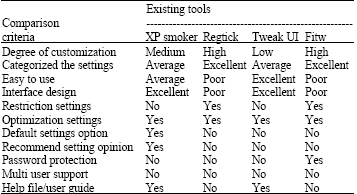 | |
Excellent categorization will use both methods to classify the settings, such as categorizing the settings according to the settings characteristic and then grouping the category with the domain that the registry settings will perform. Average categorization will only apply one of the two methods that are listed above for grouping the registry settings. Poor categorization will neither group the registry settings with the characteristic, nor group them with the domain that the settings will use. Ease-of-use is one of the important characteristics that will influence the user acceptance of the application. Excellent ease-of-use software will be designed in a more understandable form with good labeling policies, such as easy-to-understand, meaningful and representative names for the settings provide full descriptions to the user of the effect of registry key settings which are going to change and provide complete user guide documentations to the users to increase the application usability. Average level of ease-of-use software may use good labeling policies, user guide documentations, but lack registry settings description which will make it hard for the users to understand the system. Poor level of ease-of-use software is lack of documentation and settings description. Some of them do not even apply good labeling policies and thus make the system harder to learn.
Interface design has been classified into three levels. Using the group box properly to group similar registry settings together, applying good interface layout design policy during the design phase and applying systematic interface design will fall into the excellent interface design level. For the moderate level, the similar settings are not grouped properly or good interface layout policy was not applied in the user interface design. Poor interface design may not apply any of the requirements stated above.
MATERIALS AND METHODS
The problems encountered with the Windows Registry and their proposed solutions are defined and listed below. The study also depends on the review of the existing system that we have discussed above. From the defined proposed solution, we suggest tools that we have developed to support all features of Windows. The study was conducted from January until May 2008 in Faculty of Computer Science and Information Technology, University of Malaya. After developing the tool, there are 50 users taking part in the testing process for the implementation of Registry Tuning Tool.
Protect windows registry: The Registry is the main database in Windows for storing the configuration settings. It stores large quantities of complex, undocumented and unprotected configuration data which are very important and will affect the Windows stability if they are missing or misconfigured. These characteristics of the Windows Registry have made it the most vulnerable component of the Windows operating system. Users with administrator rights typically have full control to modify the Registry keys. Unwittingly executing malware-infected administrator privileges can result in Registry modification which may adversely affect the system stability: most malware tends to modify the Registry settings, so that it can be loaded during the system start-up or be executed at a specified date or time.
The local administrator or the SYSTEM accounts are the juiciest targets on a Windows operating system because they are the most powerful accounts. All other accounts have very limited privileges compared with the administrator and SYSTEM. Compromise of the administrator or SYSTEM accounts is thus almost always the ultimate goal of an attacker. If Registry settings are changed by the intruder, such as changing the system path to enable the use of floppy disks, security may be diminished. The system administrator cannot, however, just lock up the Registry because there are many valid reasons-generally associated with applications-why users would need the right to change the Registry settings. To set the access control list in part of the Registry is therefore important. Besides, all access control and assorted parameters located in the Registry will also attract the hacker to the system. Most Explorer Hijacker variants change values in the Windows Registry, thus permanently changing the behavior of certain applications, such as internet explorer. Safeguarding the administrator account, however, will be more complicated than merely assigning a good and secure password. Windows idiosyncrasies and bugs and insecure default configuration settings, will always constitute a lot of security holes which the system intruder can exploit to take over the system control. It is important to secure the Windows Registry in order to make the system safer and prevent problems from causing eventual failures. The operating system will also be easier to troubleshoot after failure occurrence.
Optimizing the windows registry: In windows registry, all of the Registry settings will be set at default value once Windows is installed to the user`s computer. This will assure the user that the operating system will be compatible to any hardware platform that s/he is using. The default settings will promise stability of the system, but the computer hardware has to compromise and can never perform to its optimum, although the computer is equipped with the latest technologies of hardware. Fine-tuning the system Registry settings will help the user to enjoy a faster, cleaner and more stable environment and also greatly minimize computer slowdowns and crashes. By optimization of the Registry, the user system will become more secure and decrease the chances of unauthorized system intruders accessing the system. The default settings of Windows allow multiple repeated attempts without either logging failed or disabling the accounts after a set number of failed attempts. Windows NT becomes more vulnerable because it allows the user logon to be anonymous and gives access to sensitive information, such as lists of account names and groups, which will allow the intruder or hacker to get at the important information and hack the system more easily. Computer security can be enhanced to prevent these situations by optimization of the Windows Registry settings.
User restriction policies: Operating systems nowadays offer a platform that allows complex software interactions and allows every computer to have more than one user. Some of the computer administrators tend to assign all users with administrator privilege and this is a bad practice for system security because it will make the computer more open to attack. Some of the undisciplined uses and sharing of sensitive configuration data by certain applications have made computers more vulnerable to fragility, as mentioned by Ganapathi et al. (2004).
Most of the computer malware is installed on the victim computer silently and infected from malicious software. The user may not be aware that they have executed or install malware into their computer because the malware is embedded or hidden in useful software. Most of the users directly download anything from the internet and execute it without scanning the file with antivirus software. This is an unhealthy practice for the system, which can cause system security to become more vulnerable, especially to those users who are using the account with administrator privileges to execute that infected application. So, it is important to set some restrictive policies for certain users to minimize the risks. Although some may argue that applying restrictive policies to the user computer may lead to complexities leaving the system end-users and administrator with difficult problems to troubleshoot, it is undeniable that the system security will be enhanced if such policies are applied. Certain users should be restricted from executing the script file, such as VBScript, to prevent malicious code editing the system settings. The system which applies restrictions will also prevent some unsupported applications trying to change the system default configurations.
RESULTS
Many administrators claim that the existing Registry tuning systems available in the market provide limited settings to configure. Some of the settings that are needed by the organization are not implemented in the application. Thus, the administrator of an organization may have to use more than one tuning tool to configure the system settings, or configure the specific system settings manually. It is a risky job for the inexperienced administrator to configure the systems settings manually and the system may be unstable or corrupt owing to misconfiguration by the administrator. One solution is proposed by Candan et al. (2001), who describe how dynamic binding successfully allows us to store and generate any content from databases in e-commerce systems. Analyzing how dynamic binding can offer great security, Registry Tuning Tool is the best solution in order to offer the Dynamic binding strategy links the database dynamically with applications. Any changes to the database will be reflected in the settings provided by the application. The Registry Tuning Tool implements the dynamic binding strategy, where the information of the system settings provided to the user to configure is stored separately in an independent database. The settings information will be retrieved from the specific linked database during the runtime of the Registry Tuning Tool and displayed to the user in Check-Box style, to assist the administrator to modify their system settings.
Figure 1 shows the dynamic banding architecture which is important for the Registry Tuning Tool in order to provide the user with a more flexible environment to increase the expendability and upgradeability of the Registry Tuning Tool. Since the settings information is stored in an independent database, the user is free to add new registry settings to the database, update the settings information and delete the useless settings from the database.
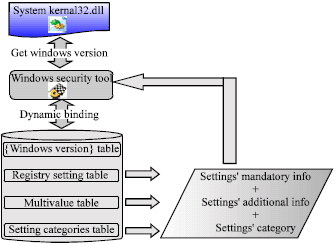 | |
| Fig. 1: | Dynamic binding architecture |
Database flow explanation: The same registry settings value may have different effects on different versions of the Windows operating system. Thus, the Registry Tuning Tool should insure that only the registry settings which are supported by specific Windows versions will be loaded into the application and displayed to the user. For that reason, the Registry Tuning Tool tends to have different tables for storing the settings` names that are supported by different versions of Windows operating systems to prevent unsupported settings information being loaded during the application runtime.
During the Registry Tuning Tool runtime, the Windows operating system version will be detected and this information will be used for the Registry Tuning Tool to link the associated registry settings table, to load the system settings` names and display the retrieved names to the user in the Check-Box format. Before the Check Boxes are shown to the user, data will be categorized in several categories in order to increase the readability of the settings and the settings will be displayed in a more structured fashion. Once the Registry Tuning Tool has retrieved the settings` names successfully, these names will be used as keywords to retrieve the registry settings information and the additional settings information which will be used to assist the administrator to configure the system settings. Figure 2 shows the architecture design of Registry Tuning Tool which consists of three important tiers, Data Tier, Business Tier and Presentation Tier. The Registry Tuning Tool is an application that allows the user to change their system settings in a graphical user interface environment. It uses a database to store the data that are needed for the user to perform various operations
The data tier means that the data stored in the database include the user account information, the hashed password, the registry settings information and the registry settings` additional information. Instead of using this database, the Registry Tuning Tool will also communicate with the system registry database, to retrieve the system settings value from the user operating system and display it to the user. The user might change their system settings through this Registry Tuning Tool. The changed settings will be updated to the system registry database once the user applies the changed settings information to the database.
The business tier, also known as the Logic Tier, is the tier to perform various operations by applying the predefined rules to manipulate the database. The registry settings information retrieved from the database can be listed or searched specifically, in order to display the requested information to the user. The business tier will communicate with the system registry database from the Data Tier and retrieve the current system settings values, either for displaying purposes or for data manipulation purposes.
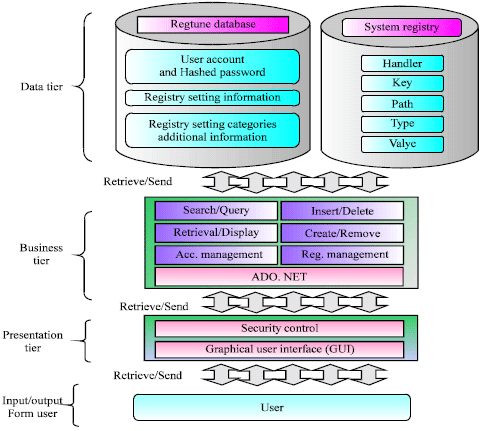 | |
| Fig. 2: | Architecture design of registry tuning tool |
The user account or registry settings can be set, retrieved or managed in this business tier. While the user is manipulating the database, the predefined rules in the business tier should be strictly followed. ADO.NET is used to establish the communication between the database and the Registry Tuning Tool. The Presentation Tier is the tier where the manipulated data are presented to the user. The Windows form is used to present the manipulated data and all operations in this tier are under security control to prevent unauthorized personnel abusing the functions that are provided by the Registry Tuning Tool. All of the data will be displayed in a graphical user interface windows form, to which the user design interface principles will be applied.
The testing methodology which is used to test the Registry Tuning Tool consists of five phases, which will cover on the unit testing, integration testing, system testing, security testing, user acceptance testing. Figure 3 shows login module tested for unit testing. All of the modules which are containing in the system is tested alone, where the unit testing to discover errors that may exist in the module`s code. Different input used to perform the unit testing, to ensure the corrected outputs expected are generated. Since modules coexist and work together with other modules is the Registry Tuning Tool, the modules should be tested together in a larger group named Integration testing which is intended to identify the defeats or vulnerabilities in the system. The root module, as the coordinating module with the subordinated modules will be tested at the beginning. The subordinated modules from the same level will be added and to the structure chart tree and the testing will be continued. Once the coordinating module and all of its immediately subordinated modules have been tested, the integration testing can be continued by adding the modules from the next level, until all of the modules in are added into the structure chart tree and proper tests have been run on every module as shown in Fig. 4.
Next, for the system testing, two or more components will be integrated together to implement the system functions or features, for validating purpose. The system testing is concern with testing the entire system in an iterative process which the objective for this is to validate the Registry Tuning Tool`s requirements as stated in the system requirement specifications. Thus, a series of tests are designed and planned to examine the system capabilities and the limitation of the system.
Authentication and Access Control mechanism were implemented in Registry Tuning Tool to provide a secured working environment for the authorized users where this tested in security testing.
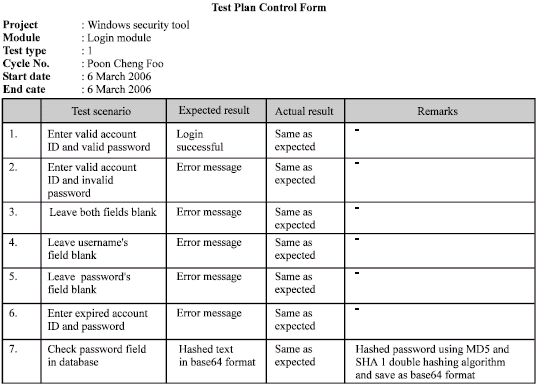 | |
| Fig. 3: | Unit testing |
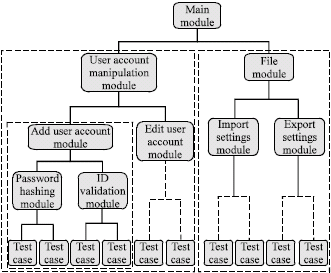 | |
| Fig. 4: | Integration testing |
The login module will be tested aggressively for any possible attempt to access by the unauthorized personnel meanwhile, Access Control security testing is to ensure the system will only assign the correct permissions to the authorized logged in user.
The user review of a specific system can be gathered through the user acceptance testing of the system, which is type of the black-box testing process, where the tests are derived from the system specification. The results of User Acceptance Testing which was done have been gathered, organized and describe as the following sections from different aspects.
DISCUSSION
In User Acceptance Testing, usability, reliability, security and correctness of the tool has been tested. Usability is one of the most important non-functional requirements which should be embedded into a Registry Tuning Tool where it allows the users to perform their task easily through the developed system. According to the gathered 50 user reviews, 82% of the users feel that this tool is easy for them to learn and perform their task after their try. Only 18% of the users feel that it is hard for them and all those users do not have computer background and have no idea with Windows Registry at all.
Beside, the usability of the system can also be determined by considering amount of time spent by the users to learn to use the tool. The results were gathered and show in Fig. 5. It shows that 46 (91%) of the users able to use this tool to perform various operations within 1 h and only 4 (9%) of the user have to spend less than 3 hours to learn the all of the features.
Reliability is the mandatory emergent properties which should be implemented into this application in order to provide the user a reliable working environment to prevent error occur due to the misconfiguration of the system. From Fig. 6 that shows reliability rating, 28 users feel that the reliability is rated as good, where 14 rated the tool is very good.
 | |
| Fig. 5: | Spent time for learning registry tuning tool |
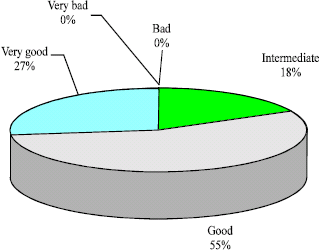 | |
| Fig. 6: | Reliability rating of windows security tool |
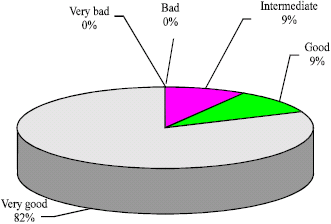 | |
| Fig. 7: | Security rating in windows security tool |
Figure 7 illustrated the security rating shows that majority of the users, which are 40 of them feel that this tool is implemented with a very good security and can prevent the unauthorized user effectively. Five of the users rated it as good and another 5 rated it as intermediate security rating.
Changing the system settings is one of the risky actions for the inexperience user to perform where it shows the correctness of the tool. 46 of the user agreed that the Registry Tuning Tool return the expected results to them, whereas only 4 of the users do not agree with that, because those user claim that by changing the Optimization Settings which are provided in Registry Tuning Tool, their systems performance are not boost significantly.
CONCLUSION
The user reviews of the registry tuning tool are collected during the system testing phase. By analysis of the user reviews and opinions, certain parts of the registry tuning tool are suggested for enhancement or improvement, in order to provide the users with a more effective automated tool which can meet future users` requirements. All these improvement and enhancements which will be implemented in the next version of the Registry Tuning Tool will be able to increase users` satisfaction, as well as to attract more users to use this application to customize their system settings for different purposes.
| • | The registry settings which are defined by the user should be tested and verified before the associated information is updated on the database. This feature can help the user to insure the correctness of the registry settings` information in the application database, to eliminate invalid system settings` values being applied to the system registry database. The risk of a local system being corrupted owing to the misconfiguration of the system settings can be minimized |
| • | One additional level of account privileges should be implemented, which is Experienced Administrator, who may have the right to define new registry settings, modify predefined registry settings or to remove unneeded registry settings from the database. This improvement can help the organization to organize personnel in more effective ways. Only named administrators who are holding this type of account privilege will have the right to manipulate the defined registry settings in the database. This can minimize the chances of a system being corrupted owing to invalid system settings which are defined mistakenly by the users |
| • | The normal user should have the read-access right for the local machine settings whereas only the changes in current user settings that have been made by the user will be updated on the system registry database. The local machine settings should be enabled for the normal user for learning purpose |
| • | The logs report which is generated by the Registry Tuning Tool should be well organized so the related logs can be grouped by date-time criteria or user, in order to increase the readability of the log reports |
| • | The number of settings` groups should be increased, so the system settings which are provided by the Registry Tuning Tool can be grouped precisely according to the settings` characteristics. This can increase the application user-friendliness indirectly |
| • | The Registry Tuning Tool should support system settings configuration through network, so the organization administrator can easily apply a restrictive policy to all of the computers in the organization |
ACKNOWLEDGMENTS
First and foremost we would like to express our gratitude to the Almighty, who gave us the chance to complete the research work successfully. Secondly, we would like to forward our deepest thanks to colleagues, lecturers and technical staffs from the Department of Software Engineering for their endless assistance, technical advice and co-operation.
REFERENCES
- Abassi, R. and S.G. El-Fatmi, 2008. A model for specification and validation of security policies in communication networks: The firewall case. Proceedings of the 3rd International Conference on Availability, Reliability and Security, Barcelona, March 4-7, 2008, IEEE Computer Society, pp: 467-472.
CrossRefDirect Link - Candan, K.S., W.S. Li, Q. Luo, W.P. Hsiung and D. Agrawal, 2001. Enabling dynamic content caching for database driven web sites. ACM Sigmod Rec., 30: 532-543.
CrossRefDirect Link - Carvey, H., 2005. The windows registry as a forensic resource. Digital Invest., 2: 201-205.
CrossRefDirect Link - Chang, K., G. Kim, K. Kim and W. Kim, 2007. Initial case analysis using windows registry in computer forensics. Proceedings of the Conference on Future Generation Communication and Networking, December 6-8, 2007, Jeju Island, Korea, pp: 564-569.
CrossRefDirect Link - Compagna, L., E.P. Khoury, F. Massacci, R. Thomas and Z. Nicola, 2007. How to capture, model and verify the knowledge of legal, security and privacy experts: A pattern-based approach. Proceedings of the 11th International Conference on Artificial Intelligence and Law, June 4-8, 2007, Stanford, California, ACM., New York, USA., pp: 149-153.
CrossRefDirect Link - Du, W., P. Garg and A.P. Mathur, 1999. Security relevancy analysis on the registry of windows NT 4.0. Proceedings of the 15th Annual Computer Security Application Conference Radisson Resort Scottsdale, December 6-10, 1999, IEEE Computer Society, Phoenix, Arizona, pp: 331-338.
CrossRefDirect Link - Ganapathi, A., Y.M. Wang, N. Lao and J.R.Wen, 2004. Why PCs are fragile and what we can do about it: A study of windows registry problems. Proceedings of the International Conference on Dependable System and Networks, June 28-July 1, 2004, IEEE Computer Society, Florence, Italy, pp: 561-566.
CrossRefDirect Link - Kim, Y. and D. Hong, 2008. Windows registry and hiding suspects' secret in registry. Proceedings of the 2nd International Conference in Information Security and Assurance, April 24-26, 2008, IEEE Computer Society, Busan, Korea, pp: 393-398.
CrossRefDirect Link - Lee, Y.W. and K.A. Kozar, 2008. An empirical investigation of anti-software adoption: A multitheoretical perspective. Inform. Manage., 45: 109-119.
CrossRefDirect Link - Lynette, Q.N., T. Demir, J. Rowe, F. Hsu and K. Levitt, 2007. A framework for diversifying windows native APIs to tolerate code injection attacks. Proceedings of the 2nd ACM Symposium on Information, Computer and Communications Security, March 20-22, 2007, ACM. New York, USA., pp: 392-394.
CrossRefDirect Link - Mazeroff, G., J. Gregor, M. Thomason and R. Ford, 2008. Probabilistic suffix models for API sequence analysis of windows XP applications. Pattern Recog., 41: 90-101.
CrossRefDirect Link - Mee, V., T. Tryfonas and I. Sutherland, 2006. The windows registry as a forensic artefact: Illustrating evidence collection for internet usage. Digital Invest., 3: 166-173.
CrossRefDirect Link - Pereira, F., D. Ordonez and E.D. Moreno, 2008. SSDR-Reconfigurable firewall: Reconfiguration model performance. Proceedings of the 4th Southern Conference on Programmable Logic, March 26-28, 2008, Bariloche, Patagonia, Argentina, pp: 253-256.
CrossRefDirect Link - Viega, J. and J. Voas, 2000. The pros and cons of UNIX and windows security policies. IT Professional, 5: 40-47.
CrossRefDirect Link - Wu, M.W., Y.M. Wang, S.Y. Kuo and Y. Huang, 2007. Self-healing spyware: Detection and remediation. IEEE Trans. Reliability, 56: 588-596.
CrossRefDirect Link